
SC-500 Live Demo: Azure API Management + Azure Functions
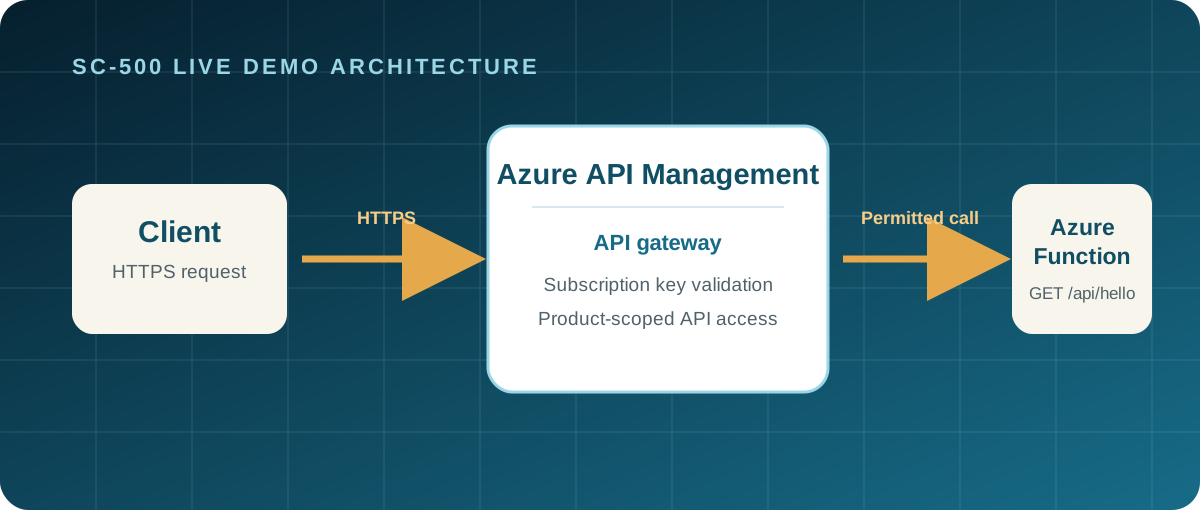
This hands-on SC-500 demonstration shows how an API gateway can protect a small HTTP backend without placing gateway security rules in the application code. Azure API Management (APIM) receives the client request, validates the subscription key, and forwards only permitted calls to the Azure Function.
Open the complete Azure APIM + Functions demo source on GitHub
What you will demonstrate
- An Azure Function App serves a small Python HTTP API at
GET /api/hello. - Azure API Management is the public gateway for the API.
- APIM rejects requests without a valid subscription key before they reach the backend.
- A permitted APIM request returns the same JSON greeting as the Function.
- Gateway policy is separate from the Function’s application code.
Why this matters for SC-500
The demo makes a security boundary visible. The Function has one job: return a greeting. APIM controls API publication and subscription-key access, so gateway policy can be changed without changing the application. A subscription key is useful for API-consumer access control, but it is not a substitute for user authentication or full application authorisation.
For a production service, also restrict the backend’s network access or use an authenticated gateway-to-backend pattern. Do not expose subscription keys in documentation, browser code, screenshots, source control, or logs.
Resources and cost model
The Bicep template creates a single resource group containing:
| Resource | Demo configuration | Purpose |
|---|---|---|
| Azure API Management | Consumption | API gateway and subscription validation |
| Azure Functions | Linux Consumption (Y1) |
Python HTTP backend |
| Azure Storage | Standard LRS | Required Functions host storage |
These serverless tiers are designed for occasional lab use. The Function scales to zero and APIM Consumption has no fixed gateway instance charge, but Azure usage, storage, and data transfer can still incur charges. Delete the resource group when the demonstration is complete.
Consumption-tier limitation: this version intentionally does not demonstrate request rate limiting or HTTP
429. Therate-limit-by-keyAPIM policy is not supported in the Consumption tier. Use a paid APIM tier if that is a required learning objective.
Deploy the template and Function
Prerequisites
- An Azure subscription where you can create a resource group, Storage account, Function App, App Service plan, and APIM service.
- Azure CLI signed in with
az login. - Bash,
curl,jq, andzipon macOS or Linux. - A unique, lowercase alphanumeric resource prefix of 3-16 characters.
Clone the project and deploy it. APIM provisioning can take several minutes.
git clone https://github.com/kramit/azure-apim-function-demo.git
cd azure-apim-function-demo

RESOURCE_GROUP=azure-apim-function-demo-rg \
RESOURCE_PREFIX=sc500demo123 \
LOCATION=westeurope \
./scripts/deploy.sh
The script deploys infra/main.bicep, packages the Function source, and prints the RESOURCE_GROUP, FUNCTION_APP, and APIM_NAME values needed for testing. The safe infra/parameters.example.json file documents the Bicep inputs without including credentials or environment values.
Perform the demo
Run the supplied test script after deployment reports that APIM is ready:
RESOURCE_GROUP=azure-apim-function-demo-rg \
FUNCTION_APP=<function-app-name> \
APIM_NAME=<apim-name> \
./scripts/test-api.sh
The script retrieves the APIM subscription key through the signed-in Azure CLI session, keeps it in memory, and does not write or print it. It verifies the following sequence:
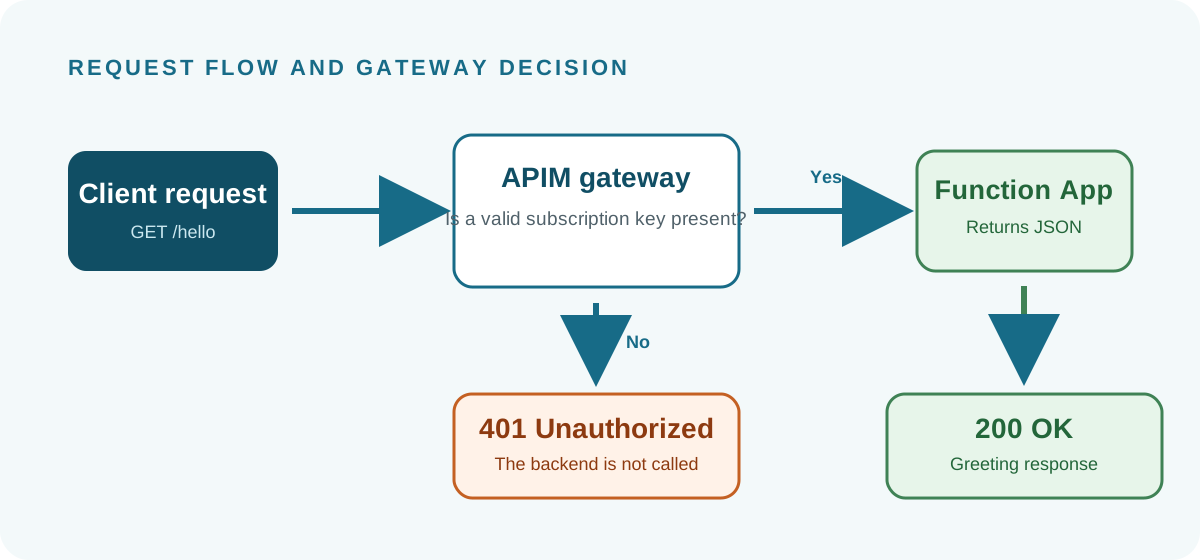
- Call the Function backend directly and observe
200 OKwith a JSON greeting. - Call the APIM endpoint without a subscription key and observe
401 Unauthorized. - Call APIM with the valid subscription key and observe
200 OKand the Function response.
Use the APIM portal’s Subscriptions area to explain that keys are issued for a subscription and should be handled as sensitive credentials. Do not copy one into teaching material or publish it on this site.
Clean up
When the lab is finished, delete the whole demo resource group:
RESOURCE_GROUP=azure-apim-function-demo-rg ./scripts/cleanup.sh